
By Milen Saavedra, Red Uno:
Watch Out for the QR Code You Scan! Follow These Steps to Avoid Digital Traps
Specialists warn that the legitimate appearance of a QR code does not guarantee a safe destination. They recommend checking the link preview and verifying the domain before entering personal information.

Source: Red Uno
In recent years, the use of QR codes has become widespread for completing transactions, accessing menus, or finding information quickly. However, this convenience has also become a favorite target for cybercriminals using fraudulent schemes.
A QR code may look completely legitimate at first glance, but it can hide the actual website to which it redirects users. To counter this type of scam, security experts recommend performing a simple check before interacting with the link.
Key Steps to Verify a QR Code
To avoid fake websites and protect personal information, experts advise following a five-step protocol:
- Scan with caution: Although the process begins by scanning the code with your smartphone camera, avoid opening the link automatically.
- Review the preview: Before tapping “Open,” carefully examine the preview of the web address displayed on your screen.
- Verify the domain: The domain should match exactly the official website of the institution or brand. Be wary of unusual words, suspicious alterations, or slight misspellings.
- Look for warning signs: Be suspicious if the message urges immediate action, requests a payment, offers a prize, or asks you to “verify” information under pressure. Also watch for spelling mistakes or strange letter combinations.
- Choose a safer route: If something seems off or the page asks for passwords or sensitive information in a questionable way, close the window and visit the official website by manually typing its address into your browser.
The golden rule of cybersecurity is that if there is the slightest suspicion—or if a link unexpectedly requests confidential information—you should stop browsing immediately to avoid identity theft or financial fraud.
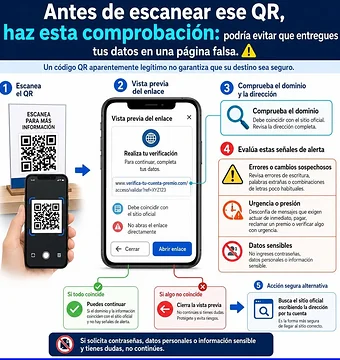
Follow these steps to avoid falling into digital traps. Image: Downloaded from the internet.
Por Milen Saavedra, Red Uno:
¡Cuidado con el QR que escaneas! Sigue estos pasos para no caer en trampas digitales
Especialistas advierten que la apariencia legítima de un código QR no garantiza un destino seguro; recomiendan revisar la vista previa del enlace y verificar el dominio antes de ingresar datos personales.
Fuente: Red Uno
En los últimos tiempos, el uso de códigos QR se ha masificado para realizar trámites, acceder a menús o buscar información de manera rápida. Sin embargo, esta comodidad también se ha convertido en el blanco favorito de los ciberdelincuentes mediante técnicas de fraude.
Un código QR puede verse completamente legítimo a simple vista, pero oculta el verdadero sitio web al que redirige al usuario. Para contrarrestar esta modalidad de engaño, expertos en seguridad recomiendan realizar una sencilla comprobación antes de interactuar con el enlace.
Pasos clave para verificar un código QR
Para evitar caer en páginas falsas y proteger la información personal, se aconseja seguir un protocolo de cinco pasos:
- Escanear con precaución: Aunque el proceso inicia con la lectura del código mediante la cámara del celular, se debe evitar abrir el enlace de manera automática.
- Revisar la vista previa: Antes de hacer clic en abrir, es fundamental observar la vista previa de la dirección web que arroja la pantalla.
- Comprobar el dominio: El dominio debe coincidir de forma exacta con el sitio oficial de la institución o marca, descartando variaciones con palabras extrañas o cambios sospechosos.
- Identificar señales de alerta: Se debe desconfiar si el mensaje asociado exige actuar de inmediato, realizar un pago, reclamar un premio o “verificar” datos bajo presión, así como prestar atención a errores ortográficos o combinaciones de letras extrañas.
- Optar por una vía segura: Si algo no coincide o la página solicita contraseñas e información sensible de manera dudosa, lo más seguro es cerrar la ventana y buscar el sitio oficial escribiendo la dirección manualmente en el navegador.
La regla de oro en ciberseguridad es que, ante la mínima sospecha o si el enlace solicita datos confidenciales de forma imprevista, se debe interrumpir la navegación de inmediato para evitar el robo de identidad o fraudes financieros.
Sigue estos pasos para evitar caer en trampas digitales. Imagen: Descargada de internet.


Leave a Reply